Hiển thị các bài đăng có nhãn Magento One Page Checkout extension. Hiển thị tất cả bài đăng

Chủ Nhật, 21 tháng 9, 2014

How to enhance your checkout process in order to convert more customers

Why do your customer add products to their shopping card and then leave it? How to make them complete their purchas seems to be the most popular question for any businesses. Probably you are making a lot of mistake when designing your checkout process. Here are solutions which will improve your converstion rate.
Try our product: Magento One Page Checkout

Ask for as Much Information as You Need…

…but not a single field more. A customer’s sense of dread increases dramatically with every field you add to a form on a page. For some, it’s just a matter of the time it takes to type in all their information; for others, their worry about identity theft and fraud grows with each piece of information they need to provide. Even if your shopping cart software has a default field, you likely don’t need to use it. For example, if you don’t use a customer’s fax number for anything, why ask for it? Most e-commerce communications are handled by email and phone, not fax, so many companies can omit this field. If you only ship within your own country, don’t ask customers to choose a country. Simply put a small statement at the bottom that reminds people of your policy, instead of a dropdown with a single country in it. (Or even worse, a dropdown filled with countries that generate an error when the form is submitted!)

Provide “Breadcrumbs”

Many shopping carts don’t provide a single Magento checkout page, and the jury is still out on whether they are more user-friendly than checkout processes that span multiple pages. If your checkout process includes more than one page, make it simpler by reminding your customer where they are in the overall process with a clear graphic. Think of it as the sign near the entrance to your local shopping mall with the “You are Here” pointer, except it’s a map for your website. As an added bonus, you can also reinforce the concept of security with your choice of words and graphics in the image.

Scrub Addresses

Scrubbing addresses is becoming more widespread on e-commerce sites. The idea is that there’s a layer of technology on the back-end that takes the addresses (especially the shipping address) and compares it against a known set of addresses, such as the US Postal Service address database, and returns a scrubbed address – one that has been verified as a real address, and formatted according to carrier preferences.
This concept has a number of benefits. First, it can reduce address-correction fees with your shipping carriers (UPS, FedEx, and the postal service). Second, it can reduce costs associated with returned packages due to undeliverable addresses. Third, it can improve the accuracy of sales tax calculations in destination-based tax states. The USPS provides this service, but under very limited circumstances (for example, you must be an active USPS shipper). Our own AccurateTax service offers address scrubbing as a stand-alone service or as part of our sales tax solutions. And there are other options for various carts. 

Required and Optional Fields

A corollary to the above rule: don’t make a field required unless it needs to be. Visually, the customer address forms need to have an indicator that shows which fields are required and which ones are optional, and they need to align well vertically. The most common indicator is an asterisk. However, if every field is required, don’t put an asterisk by each one. A single statement at the top that says “All fields are required” will suffice and clear some of the visual clutter – and customer confusion over why every field has the asterisk.
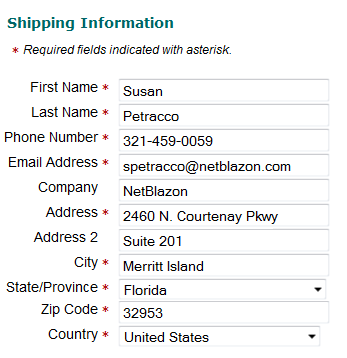
Customer Address Form

Use Trust Marks

Recognized trust marks are a simple way to remind customers of the protection you place on their personal information and payment details. Trust marks come in a variety of forms. The simplest one to include, that usually doesn’t add any additional cost to your overhead, is the security badge offered as part of your SSL certificate. All of the major SSL certificate providers offer such badges – you’ve likely seen Verisign, GeoTrust, Thawte, and other security badges on major e-commerce sites.
A second form of trust marks includes those from companies that scan your site for security holes and PCI violations. These became well-known several years ago when the HackerSafe logo become prominent, and MarketingSherpa reported amazing increases in conversion rates for PetCo when displaying the logo in the site’s header. Today, HackerSafe has become McafeeSecure and is still a leader in this type of service. While the McafeeSecure logo can still be seen on many e-commerce sites, they’ve been joined by a number of competitors, including ControlScan and Shopper Safe.
On checkout pages, particularly the page where customers enter their credit card details, it’s especially important to show it high on the page. On our redesign, we grouped the trust marks into a bar along with the customer service phone number and provided it near the top of every page in the checkout process for consistency.
We’ll be exploring other trust marks in an upcoming article.

Provide a Printable Receipt

A printable invoice or receipt is necessary because a) emails don’t always reach their destination, and b) customers don’t always remember their orders. Offering customers the ability to print a black-and-white, bare bones receipt once their order is complete allows them to get hard copy proof that they did indeed order X, Y, and Z from you. It also helps them find discrepancies and call to have them corrected earlier in the process.

Use the Receipt Page for Merchandising and Engagement

The receipt page is an often-overlooked place to ask the customer for additional sales, feedback, and participation. Here are a few ideas to include on your receipt page:
  • Link to your Facebook page
  • Link to your Twitter account
  • A form to sign up for your email newsletter or paper catalog
  • The chance to add a popular accessory to their order
  • An offer to upgrade their shipping for a special price

Indicate Processing and Shipping Times

Customers want to know when they will receive their order. In most cases, this depends on two factors:
  1. Processing time: how long it takes your warehouse to pack the order for shipment, and
  2. Shipping time: how long it takes the package to reach the destination.
Explain both to the customer as early as possible in the checkout process, and repeat the information as needed and in the confirmation email. 

Send an Automatic Receipt by Email


You should automatically send a receipt by email immediately after the order is placed. Some customers won’t use the printable receipt, but will expect the emailed receipt to arrive in their inbox within a minute or two of the order being completed. The email should provide a copy of the billing and shipping addresses, the cart contents (including any discounts, tax, and shipping charges), and a phone number to call in case of errors. If you can’t send out an email immediately, state the expected delay time boldly somewhere on your web-based receipt page.

Thứ Hai, 18 tháng 11, 2013

How Magento One Page Checkout extension fit your business

There is a customer who after using Magento One Page Checkout of Magestore, has written his feelings of this module on his own blog. Let’s take a little time to listen to his sharing!
Magento One Page Checkout extension
(.Commercers – a German company specializing the conception, creation, and operation of online shops and SEO as well as SEM improvement)
Here is his comment on One step checkout:
“We are now using two different versions of Magento One Page Checkout for various shops. One Page checkout of Magestore must be the most recently installed checkout because of several points: 
  • better
  • very good support
  • good adjustment

You could have this extension with just $ 149. Compared to the extension of One Step Checkout or Idev, this module is far cheaper while saving much time to configure and fitting basic functions as well)
I have found very easy to install the extension and let it work as I wish. The One step checkout backend provides a wide range of adjustments including fields to be displayed in the checkout.
Possibilities can be clearly seen:
- Different shipping address input Yes / No
- The standard payment and delivery methods
- Some preferences as Default country / city, etc.
- Shipping method to hide when there’s only one yes / no
- Default layout (3 columns / 2 columns)
- Login option type Yes / No
- Registration option Yes / No
- Guest Yes / No
- Ajax functionality on the field
- Terms de-/activate / order terms and defining
- Order Notification de-/activate and define


And now a point that is very important: If you operate functionality not as desired or even missing, you can be taken directly to Magestore Support system. They will help you quickly and conscientiously. No question, “Have you ordered support” or “You need a support hour = $ X to be booked again.”

We had two problems that were solved more or less overnight. There was a problem that if no payment option was not available, information was also displayed, and got no error message.
Secondly, the Terms and Conditions box that appears after clicking while in the back is nice match in size, but there was no scroll function so that for large GTC the display was quite long. Both problems were solved quickly and as I said overnight. We got an email with either matched or file with the code was changed.
I feel totally satisfied with this Magento One Page Checkout extension. I’m looking forward to their next update version because there have been some changes of Germany law on e-commerce shopping. Good luck and thank you, Magestore!”

Chủ Nhật, 17 tháng 11, 2013

Magento One Page Checkout extension

Magento One Page Checkout extension makes all checkout steps appear together in a single page for customers to fill in their information and modify any step at once.
  • Auto-update later steps when there’re changes in former steps
  • Enable giftwrap and short survey in checkout page
  • Add discount code, gift message, comments right in checkout page
  • Allow changing button style and checkout page layout

Magento One Step Checkout extension | Benefitshttp://magentoonepagecheckout.org/

Customers' comments for Magento One Page Checkout extension:
  • In terms of checkout process, Magestore's one page Checkout is a milestone. The checkout process is much faster now.
    AlejandroCEO LeRageShirts.com
  • The support fixed a few things without ever asking questions - It was done BAM! like this!
    Lars WillsenCEO hobbyjunglen.dk
  • Very good extension and working very well as described.
    WiwatCEO wnuansing.com

 BENEFITS

Do you know that the average abandoned cart rate is over 66%? Many customers abandon online shopping at the checkout page due to a complicated process. Improve it now by using one page Checkout extension! All checkout information such as billing address, shipping and payment method will be displayed together for customers to fill in/ correct information any step. You will be amazed at the significant increase in your store's conversion rate after installing Magestore's Magento One Page Checkout extension!

Magento One Page Checkout extension

Magento One Page Checkout extension

HOW IT WORKS

Magento One Step Checkout extension | How it works

FEATURES DETAILED

As mentioned above, when using One Page Checkout Magento, your customers will see all checkout information right away and can fill in or edit any step without waiting or going back and forth.Magento One Step Checkout extension - One Step Checkout page
When customers change their information such as an address, other sections- Shipping, Payment Method, Order Review will be auto-updated. Why is this useful? Let us give an example. When customers are considering two shipping addresses, they may see right in the checkout page that for one address, the shipping fee is cheaper and payment method can be Cash On Delivery, but with the other address, just money transfer and advanced payment are accepted.Magento One Step Checkout extension - Auto update latter steps when there's any change on former steps
The extension supports many popular payment methods, such as: Paypal, Paypal pro, Moneybookers, Sagepay, Check, Credit card... thus, you can be assured that Magestore's one page Check Out can work perfectly in any store of any country.   Magento One Step Checkout extension - Payment Methods
Previously, customers could just apply a coupon code at the shopping cart page. Now with our extension, they can apply/cancel the coupon right in the checkout page. Also, it's very convenient to add comments to the order, such as what time they want to receive a package, or special instructions. You can offer Customers to sign up for newsletters and even have the setting checked by default. Magento One Step Checkout extension - Add coupon code, comment, sign up for newsletter, attach gift message
One Page Checkout supports Gift purchasing effectively. Besides adding a gift message, customers can choose wrapping products right in the checkout page. Order review will be auto updated with the gift wrap fee added. Magento One Step Checkout extension–Giftwrap feature
Quickly survey customers? Absolutely with this module. Admin can add a question such as "How did you hear about us?" or "What do you like about us?" and provide answer options. It's a perfect way to collect customers' opinions, isn't it?  Magento One Step Checkout extension–Survey feature
You can ask customers to read the Terms and Conditions before placing an order. Click a link, and your own Terms and Conditions will display as pop-upMagento One Step Checkout extension - Terms and Conditions
GeoIP helps auto detect customers' country based on the IP address of customers and fills in data in the checkout page. Customers only need to enter a postcode or city address, then the system will auto fill in other information.Magento One Step Checkout extension - Geo IP function
What information do you wish customers to provide and in what order? You can easily configure it in administration. Enable which fields you prefer and set the position for them. Magento One Step Checkout extension–Arrange field positions in checkout
With Magento One Page Checkout extension, you can select a style for the checkout page to fit with the theme of your store and decide to show this page in 2 or 3 columns.Magento One Step Checkout extension - Change button style and checkout page layout

WEB POS FOR ADMIN CHECKOUT - OPTIONAL (+$79)

Besides online selling, Magestore’s one page Checkout also supports offline selling.

Concerning offline sales, shop assistants do not need to go through many steps to create orders as usual. They can go to the Web POS page instead, and create orders directly on the page.
Magento One Step Checkout extension - One Step Checkout for Admin
You can search products by name or SKU and directly select a product from the drop down to conveniently create an order for customers.Magento One Step Checkout extension - Search products by name or SKU
With Web POS, you can place an order as a guest or as an existing customer. If you choose to check out as an existing customer, it can be very time-saving as data in the billing address, shipping method, payment method and order review will be auto-changed accordingly.
If you select guest checkout mode, you will fill out information boxes displayed. The system also allows saving the data to create an account for later use by checking the box as shown below.
Magento One Step Checkout extension - Checkout as guest or existing customer
Besides available functions like Adding Discount Code, Gift Messages, Comments, Selecting Gift wrap…, “the Shipped” checkbox is added for shop assistants to note whether the product has been shipped or not.
In addition, with the Web-POS system, you can quickly search most recent orders by Order ID or customer names/emails. Thus, you can have a quick view of order or print out an invoice for customers.
Magento One Step Checkout extension - Search Orders